Client project3 min read
Traffic Connect, AI Content Orchestration for WordPress Sites
Tech stack
Services
- →Architecture and infrastructure design
- →Custom Laravel orchestrator development
- →WordPress plugin development
Deliverables
- ✓Admin dashboard for AI content across many sites
- ✓WordPress plugin that manages content over an API
- ✓Per-site task queues built on the Transactional Outbox pattern
- ✓Detailed installation manual describing how the solution works
Challenge
The task was to generate articles with AI for many websites at once and to control the whole process from one place. Every site ran on WordPress, so the system had to create and manage content on each of them remotely: articles, posts and the rest.
A Demo in Two Days
Literally a day or two after studying the requirements and the client's existing infrastructure, I built a demo version of the dashboard to agree on it with the client.
AI, and knowing how to use it professionally, made it possible to create an early version in the shortest possible time, get the client's approval and carry on with the work. That way we were sure this was exactly what the client expected and needed.
What I Built
Traffic Connect is a custom admin dashboard for orchestrating and executing content. A new resource is added to it as a WordPress site with a dedicated plugin installed. The dashboard talks to that plugin over an API and manages the content on the site: it creates new articles, posts and so on.
The video shows how the form for adding sites to the admin dashboard in bulk works, and what you can do with it.
Architecture
I designed the architecture and set up the whole infrastructure. Following best practice, the system uses the Transactional Outbox pattern. Each site acts as a thin client with its own database, where it records outgoing and incoming responses.
This gives every site its own task queue. As a thin client, the site itself calls the orchestrator to fetch new tasks from that queue, so the dashboard does not have to push work to sites one by one.
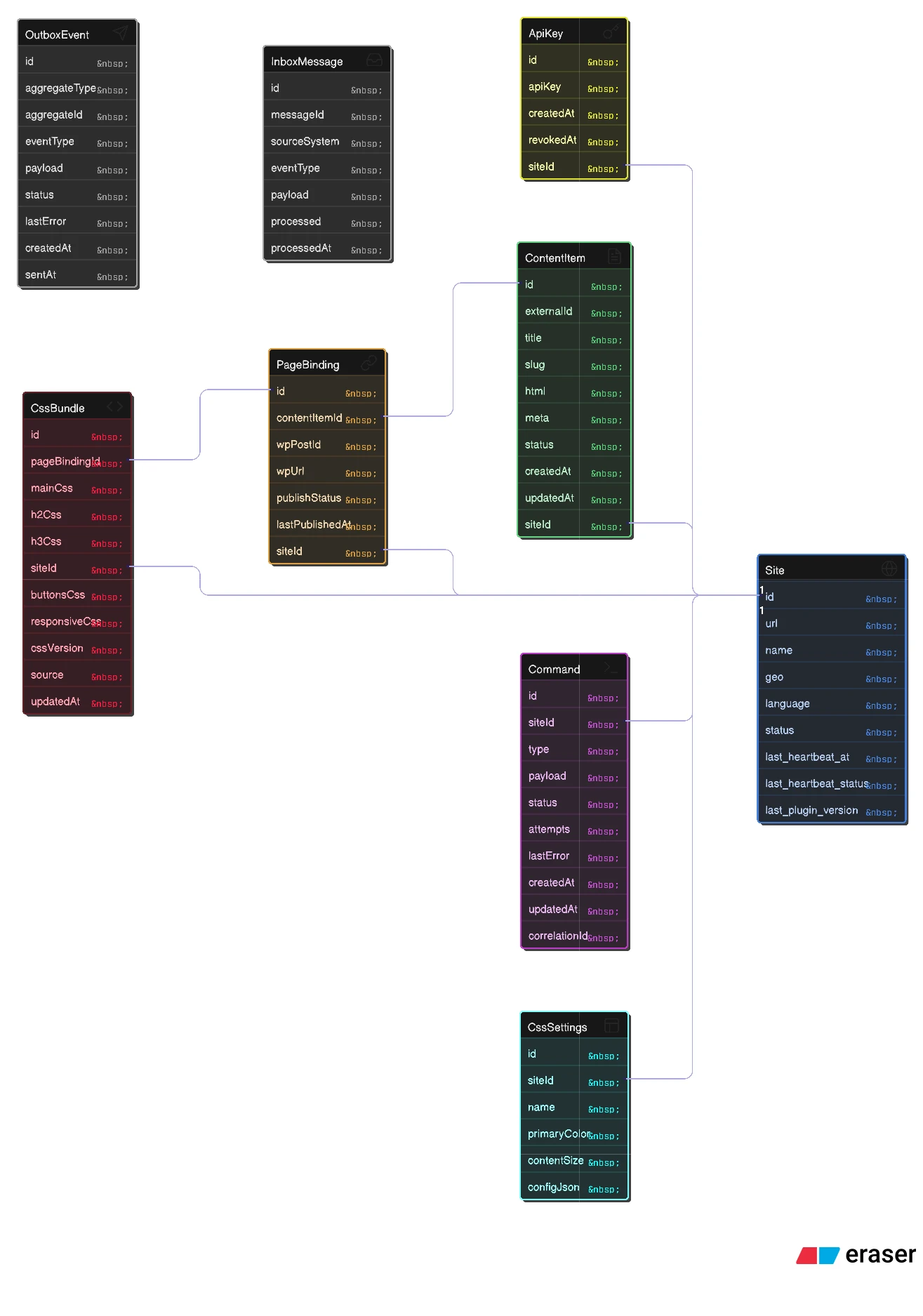
This is what the database structure looked like on the orchestrator side.
This video shows how the command queue works: how each client processes commands, how they are assigned, how errors are logged, and more.
Integration with Rewriter
This video shows the finished admin dashboard integrated with another solution from the same company for generating many sites, the Rewriter panel. Its main purpose is generating SEO-friendly texts to be published on the sites later.
Part of my task was to build a fast mechanism that passes the texts generated there on to the publishing platform. From the publishing platform those texts could then be distributed further to the rest of the sites.
Servers and Test Infrastructure
I was also responsible for setting up the servers and the test infrastructure, which took that task off the core team and freed up their time.
Following good security practice, work on a server starts with switching off the roles it does not need. Then come basic security hardening, the security configuration, and installing the software that helps catch possible threats early.
Stack
The orchestrator is a custom Laravel application, and the sites run WordPress with my plugin.
Packaging the Plugin
For the client I put together dedicated scripts that pack the plugin into a zip archive. The plugin had to be installed on every site that was going to be managed through the dashboard.
Outcome
I built the system from scratch in about a month. It turned out fast and stable. Not long after that, though, the project was frozen.
As a result of the work, the client received a detailed manual on installing the solution and on the principles of how it works. The copy below is in Russian, with secrets and links removed.
Open for contract collaboration
I am available for contract-based collaboration. If you have an interesting project idea, schedule a call via Calendly.
Schedule a 30-min call