Visual Studio Code Setup for PowerShell Development (SharePoint)
- Published on
- • 1 mins read•--- views
Instruction how to prepare visual studio code for work with powershell scripts (for sharepoint framework).
Install and download modules from here - [link].
Follow this instructions:
- Download ps-module (SP2016 link, SP2013 link) and save that somewhere on your hard drive (in dir C:\Scripts, for example)
- Edit your VSCODE profile
PS: notepad $profile
- Add import module command for file on step 1 and save document
# SharePoint 2016 Stub
Import-Module C:\Scripts\Microsoft.SharePoint.PowerShell.psm1
- Restart VSCODE
When all operations completed, intellisense will work fine:
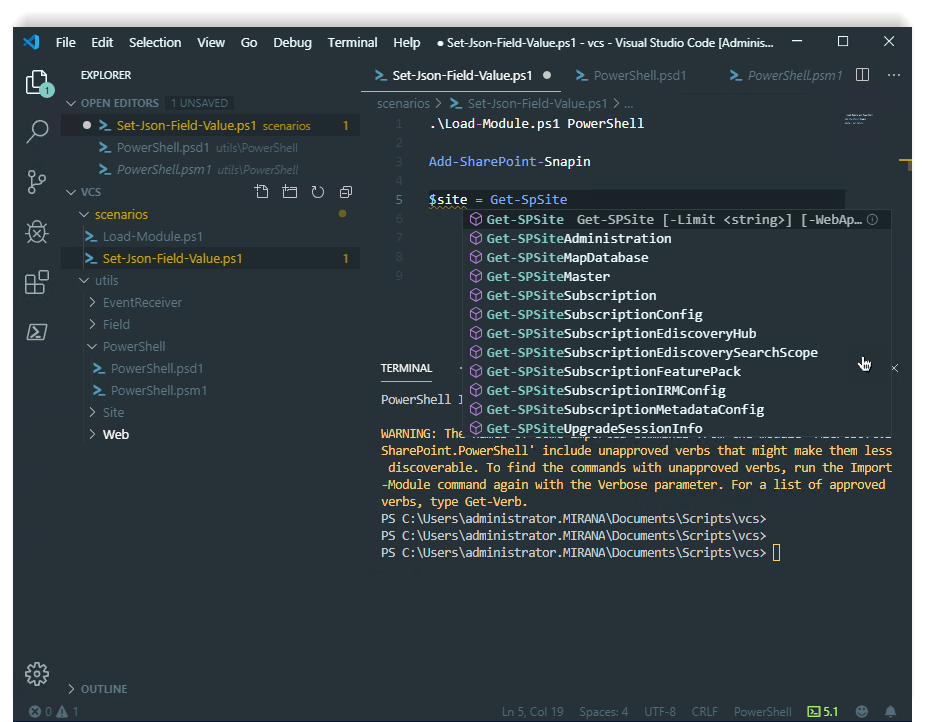
Table of Contents
Related
Posts
PowerShell Module Organization for SharePoint Development
A practical guide to organizing PowerShell scripts and modules for SharePoint development, including dot-sourcing, module manifests, and reusable code structure.
SharePoint 2013/2016: Migrating Search Service to Another Server
A step-by-step guide to migrating the SharePoint Search Service Application to a new server, including PowerShell commands and topology management.
SharePoint 2016: PrerequisiteInstaller and AppFabric Setup
Important notes and steps for preparing SharePoint 2016 installation, including how to handle AppFabric with the PrerequisiteInstaller.
Open for contract collaboration
I am available for contract-based collaboration. If you have an interesting project idea, schedule a call via Calendly.
Schedule a 30-min call